Quick start
Translate your first text in about five minutes.
What you need
- WordPress 6.2 or newer, and PHP 7.4 or newer.
- Locol Translate installed and active. See Install and activate.
- An administrator account.
Translate a text
Choose any plugin you want to translate. Every plugin works the same way.
- 1Open the screen.
In wp-admin, open the screen of the plugin you want to translate.
- 2Turn on translate mode.
Click Locol Translate in the toolbar at the top of the page. The page reloads once and every text that can be translated gets an outline.
- 3Click a text.
A small editor opens next to it.
- 4Choose the language and type.
Pick the language under Translate into, then type the translation.
- 5Save.
The text changes on the page at once and stays after you leave.
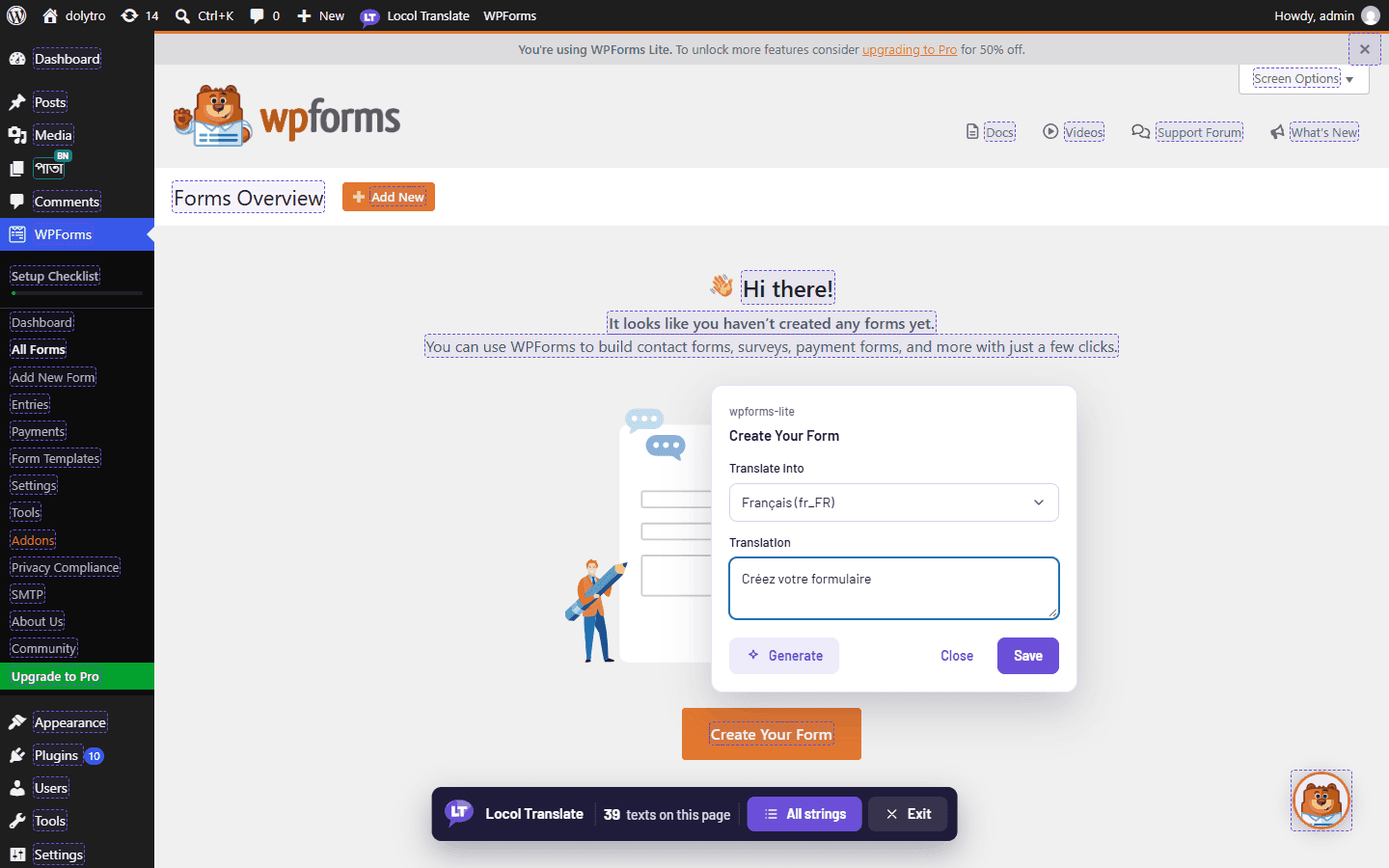
Press Exit in the bar at the bottom of the page to leave translate mode.
Check the result
Open Locol Translate in the admin menu. The Translations screen lists the text you saved, the language, and the plugin it belongs to.
If the toolbar is hidden on a page, use the floating Locol Translate button at the bottom left, or add ?lt_translate=1 to the address.
Next
- Your first translation explains the editor in more detail.
- Translate any plugin page covers the admin and the front end.